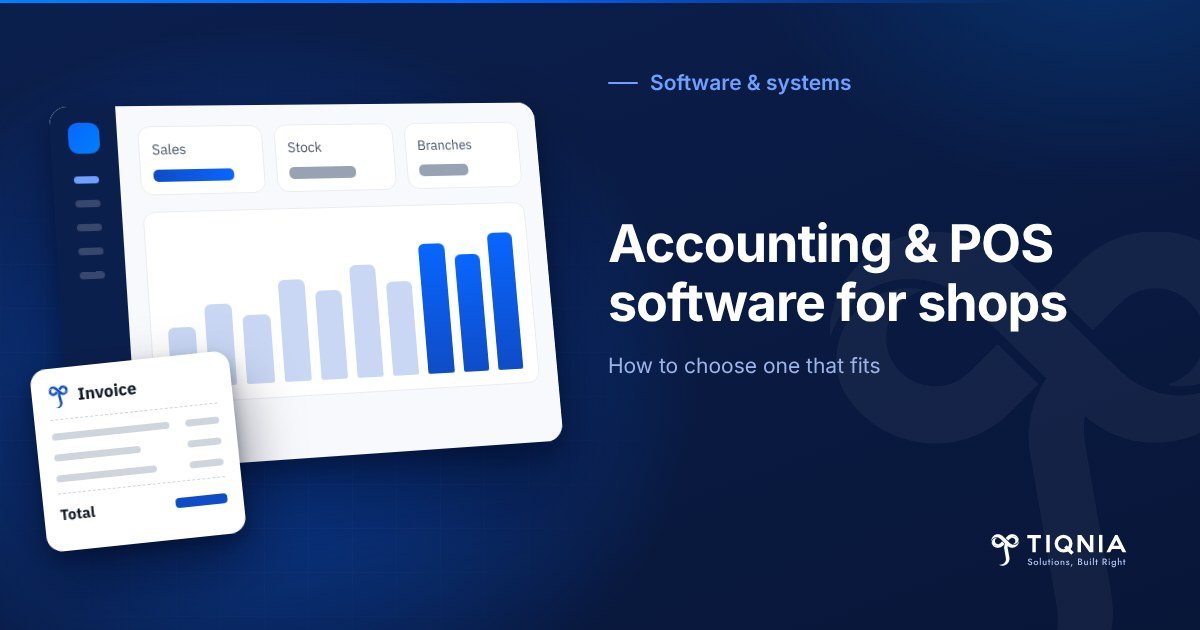
The right accounting and POS software for shops is one system where the cashier screen, the stock and the books share the same data, so every sale updates inventory and accounts on its own. Before you pay, test it on your real products, check that it closes cashier shifts properly, keeps selling when the internet drops, and is ready for your country's tax rules.
Most pages you will find on this topic are written by software vendors, and each one puts its own product first. That is normal, but it means very few of them tell you how to choose without selling you something.
This guide covers the difference between a cashier app and an integrated system, the features that matter, shift and cash-drawer control, offline selling, Egypt's e-receipt and Saudi e-invoicing, the real cost lines, and a 7-day trial plan that ends with a decision.
If you only have a minute, these are the five points:
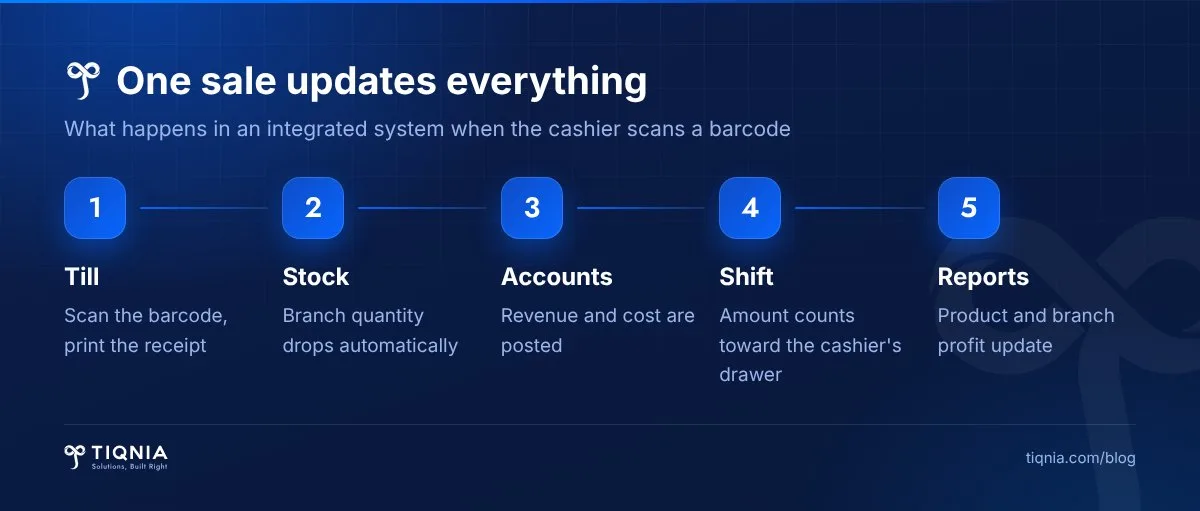
- One sale should update the till, the stock and the accounts in a single step, with no double entry.
- Shift closing and cash-drawer reconciliation matter more than a pretty screen.
- Ask what happens when the internet goes down in the middle of a busy day.
- In Egypt, the e-receipt system is phasing companies in; make sure the software can connect to it.
- Never buy from the demo; run the system on your own products with your own cashier for a full week.
What is accounting and POS software for shops?
Accounting and POS software for shops is a single system that combines three jobs: the point-of-sale screen the cashier uses, inventory management, and accounting for purchases, expenses and profit. Data is entered once, at the moment of a sale or a purchase, and every report is built from that record instead of someone copying numbers from paper into Excel.
POS stands for point of sale: the screen, the barcode scanner, the receipt printer and the cash drawer. On its own, a POS only records sales. Connected to stock and accounts, it becomes a management tool that tells you what makes money, what sits on the shelf, and where your cash went.
Do you need a POS app or a full accounting system?
A single shop with a short product list and mostly cash sales can manage with a simple POS app. Any business with branches, a warehouse, credit customers or suppliers paid in instalments needs an integrated system, because its real problem is not recording sales but knowing what it actually earned.
When a POS app is enough
- One branch and no separate warehouse.
- Mostly cash sales, no customers buying on account.
- An outside accountant does the books once a month from a sales summary.
When you need an integrated system
- Two or more branches, or a warehouse that supplies them.
- You buy by the carton and sell by the piece, or purchase costs change often.
- You have credit customers or suppliers you pay in stages.
- You want true profit per branch and per product, not just a sales total.
A simple test: if you ask yourself at the end of the month whether you made money and cannot get a quick answer, you need an integrated system. You can see how we approach these systems on our software solutions page.
Which features matter most in retail POS and accounting software?
Eight features matter most: fast barcode checkout, stock in multiple units, branches and transfers, staff permissions, shift closing, offline selling, profit reports, and support that actually answers. Software missing any of these will cost you time or money later.
- Checkout speed: a sale takes seconds by barcode or name search, and the queue keeps moving.
- Stock in units: buy a carton, sell a piece, and the cost is calculated correctly. If you sell by weight, it should read scale labels.
- Branches and transfers: see stock per branch and move goods between them with a recorded transfer.
- Permissions: the cashier sells, the manager approves discounts and returns, and every action is logged under a name.
- Shift closing: open and close a shift per cashier, count the drawer, and report any shortage or overage.
- Offline selling: sales continue when the connection drops and sync when it returns.
- Reports: profit per product and branch, slow-moving stock, and reorder alerts before an item runs out.
- Support and training: a person who answers on a Saturday morning when the printer stops, not an auto-reply.
Hardware is part of the decision too: receipt printer, barcode scanner, scale and cash drawer. Ask which devices the software has actually been tested with, and do not buy hardware until you know.
Shift closing and the cash drawer: the part most comparisons skip
Shift closing is the moment you find out whether the cash in the drawer matches the recorded sales. Most comparison pages talk about invoices and reports and rarely explain shifts, yet this is where most retail money quietly goes missing.
How a proper shift works
- The cashier opens a shift with a known opening float.
- Every sale, return and discount is recorded against that shift.
- At the end, the cashier counts the cash and enters it; the system compares it with the recorded total.
- Any difference, short or over, appears in a report that reaches the manager.
- Card and wallet payments reconcile against the terminal or gateway statement.
When you trial any system, ask to see the shift-closing report with your own eyes. If it is missing, or it shows a sales total with no reconciliation, treat the software as incomplete, however good the rest looks.
Cloud or installed: what happens when the internet goes down?
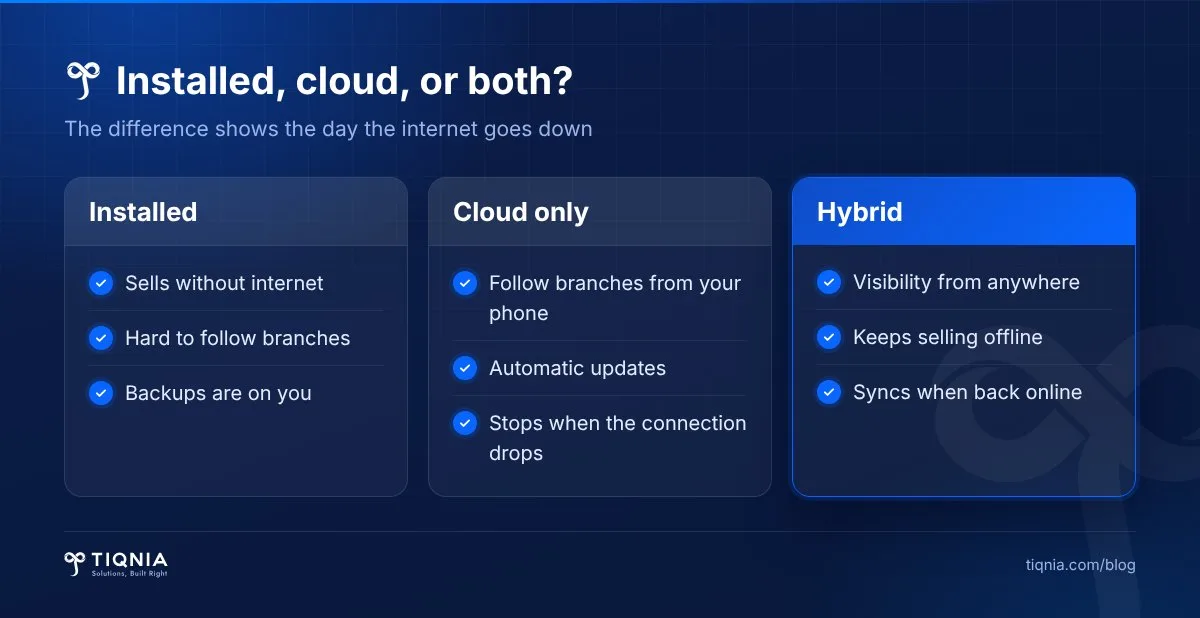
Cloud POS software lets you follow every branch from your phone, while installed software keeps working without a connection. For a shop with branches, the safest choice is usually a cloud system that can sell offline and sync when the connection comes back.
Ask a specific question: "If the internet is down for two hours on a busy Thursday evening, what does the cashier do?" A good answer has three parts: sales continue, receipts print, and data uploads later without duplicates. "The internet rarely goes down" is not an answer.
Also ask who owns the data. Make sure you can export products, customers and transactions to Excel at any time, and that automatic backups exist. That is what protects you if you change systems in two years.
Egypt e-receipts and Saudi e-invoicing: what they mean for your POS
In both Egypt and Saudi Arabia, the POS is now part of tax compliance, not only a sales tool. If your company is required to join the system, your software must connect to the tax authority and send receipts or invoices in the required format.
Egypt: the e-receipt system
The e-receipt covers sales to final consumers, and the Egyptian Tax Authority phases companies in through lists it publishes on its website. The latest announced expansion took effect on 15 September 2025 under Decision No. 281/2025 for the listed taxpayers.
According to the ETA's e-receipt brochure, a company registers on the system, codes its goods and services, completes the technical integration and registers its POS devices, and a copy of each receipt is sent to the authority at the time of sale. Whatever software you choose must support that connection or have a clear plan for it.
Saudi Arabia: e-invoicing (Fatoora)
ZATCA has required invoices to be issued through compliant electronic solutions since 4 December 2021, and Phase 2, integration with ZATCA's systems, started on 1 January 2023 in waves. ZATCA notifies each business of its wave at least six months in advance. A sale to a consumer uses a simplified tax invoice.
In practice, ask every vendor two questions: "Is the software connected to the system?" and "Who handles updates when the rules change?" These rules keep changing, so confirm your company's position with your accountant or the authority directly, not with a salesperson, including us.
What does POS and accounting software really cost?
The cost of shop accounting and POS software is more than the subscription. It has five lines: the subscription or licence, hardware, data migration and product setup, training, and support. Prices vary widely with the number of branches, users and the type of business, so any general figure you see is a rough guide at best.
- Subscription or licence: monthly or yearly by branches, users and tills, or a one-time licence.
- Hardware: the POS terminal or tablet, receipt printer, scanner, cash drawer, and a scale if you sell by weight.
- Product setup: coding thousands of items with barcodes, units and prices is real work; know who will do it.
- Training: a new cashier should learn in a day, not a week.
- Support and updates: especially tax updates; are they included or extra?
The cheapest subscription can turn out to be the most expensive choice if stock disappears unnoticed or the till freezes every day. Work out the cost over a full year and compare it with the money the system will protect.
From our experience: nine branches, one sales operation
At TIQNIA, a Dokki-based technology partner working with companies in Egypt and Saudi Arabia, we worked with 7Pets, a chain with nine branches. The goal was to make those nine branches one sales operation: an online store, an app and in-branch POS, all on the same data. You can browse our portfolio for more projects like it.
In any project that unifies branches, the hard part is rarely the cashier screen. It is making each product carry one code, one name and one unit across every branch, and getting every branch to stop working its own way. Our advice: clean up your product list before you pick the software. If you also plan to sell online, read what an online store costs in Egypt.
We also run X-Shop, an accounting, POS and inventory system for shops and companies in Egypt and the Gulf. It starts with a demo, then a 7-day trial, and if you continue you get an account manager for three months. If you have a question about a specific integration or tax requirement, ask us and we will tell you plainly what is available.
If you would like to see X-Shop running on your own products, message us on WhatsApp and tell us how many branches you have and what you sell.
How to trial POS software in 7 days and reach a decision
The best way to choose shop accounting and POS software is to run it for a week on your real business, not on demo data. Here is a simple plan that works with any system:
- Day 1: add 50 real products, including one sold by carton and piece, and one sold by weight if you have it.
- Day 2: let your own cashier sell, not the vendor's rep. Note how much training they need.
- Day 3: process a return, a discount, a card sale and a credit sale, and check how each was recorded.
- Day 4: disconnect the internet for an hour and keep selling, then reconnect and check that nothing was lost or duplicated.
- Day 5: close a shift, pull the drawer report, and run a small stock count on 10 items.
- Day 6: run the product profit report and export your data to Excel.
- Day 7: contact support with a real question and note how fast and how well they answer.
If the software gets through that week without major problems, it will probably serve you well. If it fails on day 3 or 4, you have saved yourself a year of headaches.
Questions to ask any software vendor before you sign
Before signing, ask these questions and get the answers in writing. A vendor confident in its product will not mind.
- Has the software been used in a business like mine? Can I speak to one of your clients?
- What happens to my data if I cancel? Can I take all of it?
- Who will load the products and train the cashiers, and how long will it take?
- When and how is support available: phone, WhatsApp or tickets?
- Are tax and e-receipt updates included in the subscription?
- Can I add a branch or a till whenever I need to?
To be clear about fit: if the lowest price is what matters most to you, we are probably not the right choice. We work with shops and companies that want a system that grows with them and a team that stays involved after go-live, not software that gets installed and forgotten.
The bottom line
The right accounting and POS software connects sales to stock and accounts, closes shifts honestly, keeps selling through an outage and is ready for tax requirements. Run it on your own business for a week before you decide. To see X-Shop accounting & POS on your own products, tell us what you need or book a demo on WhatsApp.
FAQs
What is the difference between POS software and accounting software?
POS software records sales and prints receipts. Accounting software tracks purchases, expenses and profit. Integrated retail software connects both to inventory, so each sale is entered once and every report comes from it.
Does POS software work without internet?
Installed POS software works offline, and some cloud systems can keep selling offline and sync when the connection returns. Ask the vendor directly and test it yourself by disconnecting the internet for an hour during the trial.
Does my POS need to connect to Egypt's e-receipt system?
If your company is among the taxpayers the Egyptian Tax Authority has listed in the e-receipt phases, your POS devices must be registered and connected, and each receipt is sent to the authority at the time of sale. Confirm your status with your accountant or the ETA.
What should I check before buying POS software?
Run it for a week on your real products with your own cashier: sales, returns, discounts, shift closing, an internet outage and a profit report. Also make sure you can export all your data to Excel at any time.
How much does POS and accounting software cost?
Cost has five parts: subscription or licence, hardware, product setup, training and support. It varies with branches, users and business type, so calculate it over a full year and ask whether tax updates are included.
Tell us what you need and the TIQNIA team will come back with a clear plan.